Integrating Rust Libraries in Android
This article introduces how to integrate a Rust library into an Android project.
Background
Recently while looking at high-performance KV stores for Android, I had an idea: find a high-performance Rust KV store, integrate it into an Android project, and call it via JNI. Simple, right? Then I stepped right into a pit.
JNI is a very mature mechanism, and exporting C functions from Rust is very reliable, so the implementation is straightforward. The questions to consider are:
- How to conveniently add new interfaces
- How to log native code errors
- How to optimize performance
Implementation
- Complete a simple JNI call
- Add protobuf support
- Better protobuf encapsulation
- Integrate LMDB
- Tuning
- MMKV
Implementing a Simple JNI Call
- Define two functions in Kotlin - one returns a value, one takes a callback. These functions load the lib file librsdroid.so
package com.linkedin.android.rsdroid;

import com.linkedin.android.rpc.NativeImpl

class RustCore {
    external fun greeting(): String
    external fun callback(cb : Callback)
    init {
        System.loadLibrary("rsdroid")
    }

    interface Callback {
        fun onSuccess()
    }
}
- Implement the corresponding functions in Rust:
#[no_mangle]
// Note: function names must correspond to the Kotlin class
pub unsafe extern fn Java_com_linkedin_android_rsdroid_RustCore_greeting(env: JNIEnv, _: JClass) -> jstring {
    let world_ptr = CString::new("Hello world from Rust world").unwrap();
    let output = env.new_string(world_ptr.to_str().unwrap()).expect("Couldn't create java string!");
    output.into_inner()
}

#[no_mangle]
pub unsafe extern fn Java_com_linkedin_android_rsdroid_RustCore_callback(
    env: JNIEnv,
    _class: JClass,
    callback: JObject,
) {
    env.call_method(callback, "onSuccess", "()V", &[])
        .unwrap();
}
The important thing is that Rust function signatures must match the Kotlin class. When calling Kotlin callbacks from Rust, check the corresponding function signatures (compile with kotlinc RustCore.kt and check the .class file, removing the ^A^C etc.)
onSuccess^A^@^C()V^A^@^QL
- Compile Rust into librsdroid.so and add it to the Kotlin project. The cumbersome way is to first compile NDK toolchains, then compile arm, arm64, x86 versions of librsdroid.so, and place them in the Android project. There's now a simpler way with the plugin org.mozilla.rust-android-gradle.rust-android
android {
...
ndkVersion "22.1.7171670"
...
}

apply plugin: "org.mozilla.rust-android-gradle.rust-android"

cargo {
    module = "../rslib-bridge"
    libname = "rsdroid"
    targets = ["x86", "arm", "arm64"]
    profile = 'release'
    prebuiltToolchains = true
    apiLevel = 21
    verbose = true
}
This completes the JNI call - very straightforward. But the current approach has issues:
- Can only pass int, String, and similar types
- Must get function parameters and callbacks right, or it may crash
Using a fixed protocol, we can conveniently solve these issues. Protobuf is a suitable solution.
Adding Protobuf to the Project
Protobuf is also a very mature project. Given a proto file, both Rust and Java can generate appropriate code, but making them work together is the challenge.
First write a proto file defining an RPC service:
syntax = "proto3";

package Proto;
option java_package = "com.linkedin.android.proto";

service DroidBackendService {
    rpc Hello(HelloIn) returns (HelloOut);
    rpc Sink(Empty) returns (Empty);
}

message HelloIn{
    int32 arg = 1;
}

message HelloOut{
    sint32 ret = 1;
    repeated string msg = 2;
}

message Empty {}
- Add protobuf support in Rust. By importing prost, generate the template trait: DroidBackendService. This ensures input/output is all []byte, with methods encapsulated in run_command_bytes2_inner_ad:
use prost::Message;
pub type BackendResult<T> = anyhow::Result<T>;
pub trait DroidBackendService {
    fn run_command_bytes2_inner_ad(&self, method: u32, input: &[u8]) -> BackendResult<Vec<u8>> {
        match method {
            1 => {
                let input = HelloIn::decode(input)?;
                let output = self.hello(input)?;
                let mut out_bytes = Vec::new();
                output.encode(&mut out_bytes)?;
                Ok(out_bytes)
            }
            2 => {
                let input = Empty::decode(input)?;
                let output = self.sink(input)?;
                let mut out_bytes = Vec::new();
                output.encode(&mut out_bytes)?;
                Ok(out_bytes)
            }
            _ => Err(anyhow::anyhow!("invalid command")),
        }
    }
    fn hello(&self, input: HelloIn) -> BackendResult<HelloOut>;
    fn sink(&self, input: Empty) -> BackendResult<Empty>;
}
Then define the concrete service implementation:
pub struct Backend {
}

impl Backend {
    pub fn new() -> Backend {
        Backend{}
    }
}

impl DroidBackendService for Backend {
    fn hello(&self, input: HelloIn) -> BackendResult<HelloOut> {
        Ok(HelloOut {
            ret: input.arg,
            msg : (0..input.arg).map(|_| "hello".to_owned()).collect(),
        })
    }

    fn sink(&self, input: Empty) -> BackendResult<Empty> {
        Ok(Empty{})
    }
}
Finally, export the service as a single function:
#[no_mangle]
pub unsafe extern fn Java_com_linkedin_android_rsdroid_RustCore_run(
    env: JNIEnv,
    _: JClass,
    command: jint,
    args: jbyteArray,
    cb : JObject,
) {
    let mut backend = Backend::new();

    let result = catch_unwind(AssertUnwindSafe(|| {
        let command: u32 = command as u32;
        let in_bytes = env.convert_byte_array(args).unwrap();
        return backend.run_command_bytes2_inner_ad(command, &in_bytes);
    }));

    if cb.into_inner().is_null() {
        return
    }

    match result {
        Ok(Ok(_s)) => {
            let data = env.byte_array_from_slice(&_s).unwrap();
            env.call_method(cb, "onSuccess", "([B)V", &[data.into()]);
            return
        }
        _ => {
            let world_ptr = CString::new("error").unwrap();
            let output = env.new_string(world_ptr.to_str().unwrap()).expect("Couldn't create java string!");
            env.call_method(cb, "onErr", "(ILjava/lang/String;)V", &[10.into(), output.into()]);
            return;
        }
    }
}
Now Java can pass protobuf data and receive protobuf callbacks. To generate corresponding Java classes, use protobuf-gradle-plugin:
def droidProtobufFolder = new File(rootDir, "rslib-bridge/proto").getAbsolutePath()

## Configure proto file path
android {
    sourceSets {
        main {
            proto {
                srcDir droidProtobufFolder
            }
        }
    }
}


## Generate Java classes
protobuf {
    plugins {
        javalite {
            artifact = 'com.google.protobuf:protoc-gen-javalite:3.0.0'
        }
    }
    protoc {
        artifact = 'com.google.protobuf:protoc:3.8.0'
    }
    // this is a task which wil generate classes for our proto files
    generateProtoTasks {
        all().each { task ->
            task.builtins {
                remove java
            }
            task.plugins {
                javalite {}
            }
        }
    }
}
Now we can call it in code:
val builder = AdBackend.HelloIn.newBuilder();
val arg = builder.setArg(1000).build();
RustCore.instance.run(1, arg.toByteArray(), object : ProtoCallback {
    override fun onErr(code: Int, msg: String) {
        Log.d("MainActivity", "msg");
    }

    override fun onSuccess(out: ByteArray) {
        val helloOut = AdBackend.HelloOut.parseFrom(out);
        Log.d("MainActivity", helloOut.toString());
    }
});
This completes the Kotlin and Rust interaction. But there's still one question: why pass cmd_number? Can't we encapsulate the method number like in Java and Rust?
Better Protobuf Encapsulation
Good news - we can adjust generated Java classes through a custom protobuf plugin:
protobuf {
    // Python script path
    String protocGenPath = OperatingSystem.current().isWindows() ? 'tools\\protoc-gen\\protoc-gen.bat' : 'tools/protoc-gen/protoc-gen.sh'
    File f = new File(project.rootDir, protocGenPath)
    if (!f.exists()) {
        throw new IllegalStateException("'${f.absolutePath}' does not exist")
    }

    //  Custom plugin
    plugins {
        // Define a plugin with name 'anki'.
        native_rpc { path = f.absolutePath }
    }

    // this is a task which wil generate classes for our proto files
    generateProtoTasks {
        all().each { task ->
            // Execute plugin to parse proto files
            task.plugins {
                native_rpc {}
            }
        }
    }
Then through a custom Python script, we can auto-generate commands:
package com.linkedin.android.rpc;

import java.lang.annotation.Retention;
import androidx.annotation.IntDef;
import java.lang.annotation.RetentionPolicy;
import androidx.annotation.Nullable;
@IntDef ({
NativeMethods.HELLO,
NativeMethods.SINK
})
public @interface NativeMethods {
    int HELLO = 1;
    int SINK = 2;
}
Now we can call using cmd:
RustCore.instance.run(NativeMethods.SINK, Native.Empty.getDefaultInstance().toByteArray(), null);
Or encapsulate it more thoroughly, generating code like:
public abstract class NativeImpl {

protected abstract void executeCommand(final int command, byte[] args, RustCore.ProtoCallback cb);

// Auto-generated code
public void hello(Native.HelloIn args, RustCore.Callback<Native.HelloOut> cb) {
    byte[] result = null;
    executeCommand(1, args.toByteArray(), new RustCore.ProtoCallback() {
        @Override
        public void onErr(int code, @NonNull String msg) {
            cb.onErr(code, msg);
        }
        @Override
        public void onSuccess(@NonNull byte[] out) {
            Native.HelloOut message = null;
            try {
                message = Native.HelloOut.parseFrom(out);
            } catch (InvalidProtocolBufferException e) {
                e.printStackTrace();
            }
            cb.onSuccess(message);
        }
    });
    }
}
Then wrap it with a helper:
 public abstract class NativeImpl
 inner class NativeHelp : NativeImpl() {
        override fun executeCommand(command: Int, args: ByteArray?, cb: ProtoCallback?) {
            run(command, args!!, cb);
        }
    }
And call it conveniently (sort of):
RustCore.navHelper.hello(
            Native.HelloIn.newBuilder()
                .setArg(10).build(),
            object : RustCore.Callback<Native.HelloOut> {
            override fun onErr(code: Int, msg: String) {
                Log.d("MainActivity", "msg");
            }

            override fun onSuccess(arg: Native.HelloOut) {
                Log.d("MainActivity", arg.toString());
            }
        });
But this approach has some issues:
- cmd_number is fixed
- No way to implement zerocopy
- Support for multiple proto files requires modifying both Java plugin and Rust custom build
These can be optimized gradually, but we can start testing LMDB integration...
Integrating LMDB
Integrating a KV store is completely transparent to Java, so I integrated both LMDB and Sled simultaneously. Just implement the DroidBackendService trait:
fn open(&self, input: Str) -> BackendResult<Resp> {
        match useEnd {
            End::LMDB=> {
                lmdb::open(Path::new(&input.val))
            }
            End::SLED => {
                db::open(Path::new(&input.val));
            }
            _ => {}
        }
        Ok(Resp{
            ret : 0,
            msg: "".into(),
        })
    }
Note that all save and get operations must happen after open, but Rust has those pesky mutability checks. So I used locks to ensure proper store initialization, then used unsafe to modify statics.
use once_cell::sync::Lazy;


static mut KV_STORE : Option<Bucket<Raw, Raw>> = None;
static KV_LOCK: Lazy<RwLock<bool>> = Lazy::new(|| RwLock::new(false));

pub fn open(path : &Path) {
    let mut kv_lock = KV_LOCK.write().unwrap();
    if *kv_lock == true {
        panic!("already opened")
    }
    fs::create_dir_all(&path).unwrap();
    let mut cfg = Config::new(path);
    let store = Store::new(cfg).unwrap();
    *kv_lock = true;
    unsafe {
        *KV_STORE.borrow_mut() = Some(Arc::new(store.bucket::<Raw, Raw>(None).unwrap()))
    }
}
Compilation was rough, running it was rough too... Since I was printing stack traces in Rust, I also introduced android_log to output logs to logcat:
# Cargo.toml
android_logger = "0.10"
log = "0.4.14"

# lib.rs

#[allow(non_snake_case)]
#[no_mangle]
pub extern "system" fn JNI_OnLoad(vm: JavaVM, _: *mut c_void) -> jint {
    android_logger::init_once(Config::default().with_tag("RustNativeCore").with_min_level(log::Level::Trace));
    JNI_VERSION_1_6
}


...
let result = catch_unwind(AssertUnwindSafe(|| {
    panic::set_hook(Box::new(|_| {
        let backtrace = Backtrace::new();
        log::error!("ops: {:?}", backtrace);
    }));
    ...
}))
...
In logcat, I found the file path was wrong. After fixing it, everything worked.
But after all that effort, introducing Rust actually performed worse than SharedPreferences...
Disappointing, beyond my imagination.
| Interface | Time for 1000 calls |
|---|---|
| SharedPreference.set(String, String) | 410ms |
| SharedPreference.get(String) | 16ms |
| Native.Sled.set(String, String) | 900ms |
| Native.Sled.get(String) : String | 800ms |
Tuning
Thought it was the end, but work had just begun. I tried an empty interface:
#[no_mangle]
pub unsafe extern fn Java_com_linkedin_android_rsdroid_RustCore_empty(env: JNIEnv, _: JClass) {
}
| Interface | Time for 1000 calls |
|---|---|
| Native.empty | 1ms |
So the problem is in parameter passing. Even simple String read/write is quite expensive:
| Interface | Time for 1000 calls |
|---|---|
| Native.testStringGet() : String | 129ms |
| Native.testStringSet(String) | 28ms |
Following JNI optimization methods, the options are:
- Pass pointers directly (GetByteArrayElements)
Get data via get_byte_array_elements:
pub unsafe extern fn Java_com_linkedin_android_rsdroid_RustCore_testByte(env: JNIEnv, _: JClass, input : jbyteArray) {
    let input = env.get_byte_array_elements(input, ReleaseMode::NoCopyBack).unwrap();
}
Write data via set_byte_array_region:
pub unsafe extern fn Java_com_linkedin_android_rsdroid_RustCore_testByte(env: JNIEnv, _: JClass,  output: jbyteArray) {
    let input = env.get_byte_array_elements(input, ReleaseMode::NoCopyBack).unwrap();
}
Doesn't seem to change much:
| Interface | Time for 1000 calls |
|---|---|
| Native.testByteArray(ByteArray) empty | 2ms |
| Native.testByteArray(ByteArray) | 100ms |
| Native.getByteArray(output : ByteArray) | 170ms |
- Pass byte buffers (ByteBuffer)
Get parameter address directly via get_direct_buffer_address, but also no improvement:
| Interface | Time for 1000 calls |
|---|---|
| Native.testByteArray(ByteBuffer) empty | 0ms |
| Native.testByteArray(ByteBuffer) | 100ms |
| Native.getByteArray(output : ByteBuffer) | 200ms |
So it seems any native read/write of Java data starts at 100ms...
At this point I was about to go bald and was ready to quietly delete this library. Then I tested on a real device, and the results were actually decent...
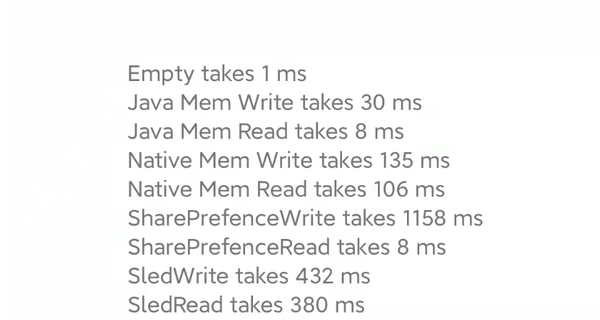
Updates:
- I found I can get input parameter pointers directly in Rust, enabling faster protobuf parsing.
- Using a similar approach, you can even achieve something like multiple return values in Java.
- Added signature verification to prevent Rust lib and Java lib from being out of sync.
- Rust stability is solid - no crashes, just compilation costs some hair
- Sled is pretty strong - just slightly slower than memory. With a Java cache, it might fly. But not ready for production because:
- Doesn't support multi-process
- Sled writes to disk periodically (default 200ms), may lose tiny amounts of data...
- LMDB is decent but not as good as imagined. Usable.
- For small KV operations, JNI overhead may be slightly too high, but for networking, it should perform better.
- With protobuf, Rust can interact with other languages, so next time I might try Flutter.
MMKV
Thought I was done, but impulsively integrated MMKV. Got humbled. MMKV's speed is basically on par with Java Map. After looking at their source code, I didn't see any black magic, then I discovered:
- Logging costs about 100ms
- Protobuf encoding/decoding costs about 100ms
So Sled and MMKV aren't that far apart after all. That's it.
References:
JNI tips | Android NDK | Android Developers
How to Idiomatically Use Global Variables in Rust - SitePoint
google/protobuf-gradle-plugin: Protobuf Plugin for Gradle (github.com)
spacejam/sled: the champagne of beta embedded databases (github.com)